background img

Dedicated to Google and Google products. Curated by Karmi Phúc.

Showing posts with label google search. Show all posts
Google Search used to have an option that allowed you to restrict results to forum pages. You'll often find helpful discussions and it's nice to be able to exclude blogs, news sites, videos, shopping sites when searching for a software bug or other tech-related issues.

Fortunately, you can still restrict results to discussions: just add &tbm=dsc to a Google Search URL.


This also works for:

- recipe search: add &tbm=rcp
- local search: add &tbm=plcs
- blog search: add &tbm=blg
- patent search: add &tbm=pts

Here's a screenshot for recipe search:


Blog Search and Patent Search also have standalone sites, while Google Maps is a good place for local search.

You can also bookmark these URLs:

Google Forum Search - https://www.google.com/?tbm=dsc
Google Recipe Search - https://www.google.com/?tbm=rcp
Google Local Search - https://www.google.com/?tbm=plcs


Another option is to visit those pages, right click the search box and select "add as search engine" (Chrome), "add a keyword for this search" (Firefox) or "create search engine" (Opera). I added the keyword "forum" for Google Forum Search, so I can type "forum" in Chrome's Omnibox, press Tab and enter the query.


Source: http://googlesystem.blogspot.com/2014/03/bring-back-forum-search-recipe-search.html

Bring Back Forum Search, Recipe Search and More

Google Search used to have an option that allowed you to restrict results to forum pages. You'll often find helpful discussions and it's nice to be able to exclude blogs, news sites, videos, shopping sites when searching for a software bug or other tech-related issues.

Fortunately, you can still restrict results to discussions: just add &tbm=dsc to a Google Search URL.


This also works for:

- recipe search: add &tbm=rcp
- local search: add &tbm=plcs
- blog search: add &tbm=blg
- patent search: add &tbm=pts

Here's a screenshot for recipe search:


Blog Search and Patent Search also have standalone sites, while Google Maps is a good place for local search.

You can also bookmark these URLs:

Google Forum Search - https://www.google.com/?tbm=dsc
Google Recipe Search - https://www.google.com/?tbm=rcp
Google Local Search - https://www.google.com/?tbm=plcs


Another option is to visit those pages, right click the search box and select "add as search engine" (Chrome), "add a keyword for this search" (Firefox) or "create search engine" (Opera). I added the keyword "forum" for Google Forum Search, so I can type "forum" in Chrome's Omnibox, press Tab and enter the query.


Source: http://googlesystem.blogspot.com/2014/03/bring-back-forum-search-recipe-search.html

google-menu.

Google đang thử nghiệm một tính năng mới cho phép người ta có thể nhìn thấy toàn bộ menu của một nhà hàng ngay đầu trang kết quả tìm kiếm mà không cần phải vào website của nhà hàng đó. Chỉ cần gõ câu lệnh "show me the menu for tên-nhà-hàng" thì ngay lập tức menu sẽ hiện ra và được chia thành nhiều thẻ để bạn dễ tham khảo, ví dụ như món chính, điểm tâm, ăn tối...

Thông tin này được Google thông báo chính thức trên trang Google+ của mình nhưng chức năng này lại chưa được phát hành rộng rãi, mình đã thử gõ cú pháp y chang trên Google.com nhưng không có kết quả, có lẽ chúng ta phải chờ vài ngày hay vài tuần nữa thì chức năng này mới có hiệu lực. Theo một số nguồn tin cho biết thì nguồn dữ liệu của Google còn khá hạn chế, không ai biết chắc chắn Google lấy dữ liệu menu từ đâu nhưng có thể là từ trang AllMenus.com.


Source: http://www.tinhte.vn/threads/google-search-se-hien-ca-menu-nha-hang-ra-ket-qua-tim-kiem.2260022/

Google Search sẽ hiện cả menu nhà hàng ra kết quả tìm kiếm

google-menu.

Google đang thử nghiệm một tính năng mới cho phép người ta có thể nhìn thấy toàn bộ menu của một nhà hàng ngay đầu trang kết quả tìm kiếm mà không cần phải vào website của nhà hàng đó. Chỉ cần gõ câu lệnh "show me the menu for tên-nhà-hàng" thì ngay lập tức menu sẽ hiện ra và được chia thành nhiều thẻ để bạn dễ tham khảo, ví dụ như món chính, điểm tâm, ăn tối...

Thông tin này được Google thông báo chính thức trên trang Google+ của mình nhưng chức năng này lại chưa được phát hành rộng rãi, mình đã thử gõ cú pháp y chang trên Google.com nhưng không có kết quả, có lẽ chúng ta phải chờ vài ngày hay vài tuần nữa thì chức năng này mới có hiệu lực. Theo một số nguồn tin cho biết thì nguồn dữ liệu của Google còn khá hạn chế, không ai biết chắc chắn Google lấy dữ liệu menu từ đâu nhưng có thể là từ trang AllMenus.com.


Source: http://www.tinhte.vn/threads/google-search-se-hien-ca-menu-nha-hang-ra-ket-qua-tim-kiem.2260022/

Google has an interactive search widget that solves geometry problems. You can search for [solve triangle], [area of a circle], [volume of a sphere], [perimeter of a trapezoid], [area of a pentagon], [hypotenuse calculator], [triangular prism volume], [calculate the diagonal of a cube with 6mm edge], [volume of a cylinder with radius 4cm and height 8cm], [a^2+b^2=c^2 calc a=4 b=7 c=?] and more.


Click the arrow and Google will show you the solution. Click one of the input boxes and the value is highlighted.


"Supported shapes: 2 and 3 dimensional curved shapes, platonic solids, polygons, prisms, pyramids, quadrilaterals, and triangles. Supported formulas and equations: Area, circumference, law of sines and cosines, hypotenuse, perimeter, Pythagorean theorem, surface area, and volume."

{ Thanks, Jonah Langlieb. }

Source: http://googlesystem.blogspot.com/2014/03/google-geometry-calculator.html

Google Geometry Calculator

Google has an interactive search widget that solves geometry problems. You can search for [solve triangle], [area of a circle], [volume of a sphere], [perimeter of a trapezoid], [area of a pentagon], [hypotenuse calculator], [triangular prism volume], [calculate the diagonal of a cube with 6mm edge], [volume of a cylinder with radius 4cm and height 8cm], [a^2+b^2=c^2 calc a=4 b=7 c=?] and more.


Click the arrow and Google will show you the solution. Click one of the input boxes and the value is highlighted.


"Supported shapes: 2 and 3 dimensional curved shapes, platonic solids, polygons, prisms, pyramids, quadrilaterals, and triangles. Supported formulas and equations: Area, circumference, law of sines and cosines, hypotenuse, perimeter, Pythagorean theorem, surface area, and volume."

{ Thanks, Jonah Langlieb. }

Source: http://googlesystem.blogspot.com/2014/03/google-geometry-calculator.html

After a few months of experiments, Google's search pages now show the name of the site next to the URL. If you click the name, you'll see a small card with information from Wikipedia, including the logo, the owner, the year when it was founded and some awards.

"You'll see this extra information when a site is widely recognized as notable online, when there is enough information to show or when the content may be handy for you. The information you'll see is based on the Knowledge Graph, Google's interconnected understanding of the things that exist in the world. As we expand the Knowledge Graph, we expect to give you more information about more websites - making it easier for you to choose the right result," informs Google.


If your site, organization or company doesn't have a Wikipedia page, no info card will be displayed.

Source: http://googlesystem.blogspot.com/2014/01/googles-info-cards-for-sites.html

Google's Info Cards for Sites

After a few months of experiments, Google's search pages now show the name of the site next to the URL. If you click the name, you'll see a small card with information from Wikipedia, including the logo, the owner, the year when it was founded and some awards.

"You'll see this extra information when a site is widely recognized as notable online, when there is enough information to show or when the content may be handy for you. The information you'll see is based on the Knowledge Graph, Google's interconnected understanding of the things that exist in the world. As we expand the Knowledge Graph, we expect to give you more information about more websites - making it easier for you to choose the right result," informs Google.


If your site, organization or company doesn't have a Wikipedia page, no info card will be displayed.

Source: http://googlesystem.blogspot.com/2014/01/googles-info-cards-for-sites.html

Google experiments with displaying a search box next to sites like Google Finance, Yahoo Finance, Reuters. There's a button with the following label: "get quotes" and you're supposed to use this feature if you want to search for share prices.

For example, when you type [Google] or [GOOG], you're sent to the right page from Google Finance, Yahoo Finance and other financial sites. If you search for [computers], you'll get a search results page from the financial site. Is this the first time when Google shows a search box and doesn't return its own results?


I checked the source page and it says that it's a rich snippet, just like those that a re used for reviews, music, events, products.

{ via Rubén }

Source: http://googlesystem.blogspot.com/2014/01/google-internal-search-finance-sites.html

Google's Experimental Search Box for Financial Sites

Google experiments with displaying a search box next to sites like Google Finance, Yahoo Finance, Reuters. There's a button with the following label: "get quotes" and you're supposed to use this feature if you want to search for share prices.

For example, when you type [Google] or [GOOG], you're sent to the right page from Google Finance, Yahoo Finance and other financial sites. If you search for [computers], you'll get a search results page from the financial site. Is this the first time when Google shows a search box and doesn't return its own results?


I checked the source page and it says that it's a rich snippet, just like those that a re used for reviews, music, events, products.

{ via Rubén }

Source: http://googlesystem.blogspot.com/2014/01/google-internal-search-finance-sites.html

Yesterday we introduced Google Instant, a change to make search fast and interactive by showing you results instantly as you type. With Instant we've turned search from a static HTML page into an AJAX application, just as we did with Google Maps and Gmail. You can learn more about Google Instant in yesterday's blog post, but we also wanted to share a peek behind the scenes into some of the engineering challenges we faced in design and infrastructure.

The design challenge: relevant, not distracting
Our key design challenge was to make sure people would notice relevant results without being distracted. We knew it would take extensive testing to find the right design, so we ran through a sequence of prototypes, usability studies (testing with people from the community), dogfooding (testing with Google employees) and search experiments (testing with a small percentage of Google users). Some of our early prototypes weren't perfect. For example, we tried a prototype where we waited for someone to stop typing before showing results, which did not work. We realized the experience needed to be fast to work well. We also considered other interfaces which essentially clustered results for a variety of queries based on probability. Here are a couple examples:


Grouped results prototype


Blended results prototype

In the end, our grouped and blended interfaces seemed too difficult to scan while typing, so we pursued a model based on a single search. We hit upon two features that worked well together: first, a query prediction in the search box in gray text and second, results for the top prediction that update continuously while the user types. In user studies, people quickly found a new way to interact with Google: type until the gray text matches your intention and then move your eyes to the results. We were actually surprised at how well this worked—most people in our studies didn't even notice that anything had changed. Google w as just faster.

The infrastructure challenge: 5-7X more results pages for typical searches
We've been optimizing performance and speed for more than 10 years, and we've found that every second counts. When we came to the infrastructure team and said, "we're going to be serving five to seven times as many results pages for each query performed in Google Instant," first they threw a fit, then they figured out how to get us there! Even before Instant, Google was serving more than a billion searches per day, and our systems were optimized to ensure those searches happen as quickly as possible (usually less than a quarter second). How could we serve so many more searches without breaking or slowing down our systems?

One solution would have been to simply invest in a tremendous increase in server capacity, but we wanted to find smarter ways to solve the problem. We did increase our back-end capacity, but we also pursued a variety of strategies to efficiently address the incredible demand from Google Instant. Some of these are quite technical, but here are some examples:
  • We deployed new caches that can handle high request rates while keeping results fresh as we continuously crawl and re-index the web.
  • We introduced user-state data into our back-ends to keep track of the results pages already shown to a given user—this way we don't re-fetch the same results repeatedly.
  • We optimized page-rendering JavaScript code to help ensure web browsers could keep up with the rest of the system.
In total, these efforts enabled us to release Google Instant while maintaining the speed people have come to expect from Google.

The engineering team at work
As Google Instant neared completion, we packed the core teams into two large rooms on our main campus. We began having daily stand stand-up meetings (more than 50 people). With all that hard work behin d us, we're thrilled to see Google Instant out in the wild! But, in some ways, this is just the beginning of a new kind of "conversational" search interaction. We will continue to experiment, as we always have—and with the help of your feedback, we hope to make Instant even better over time! While it's a big change, I personally believe that we'll look back and wonder how search was ever any other way.


Members of the Google Instant team watching the launch announcement


Source: http://googleblog.blogspot.com/2010/09/google-instant-behind-scenes.html

Google Instant, behind the scenes

Yesterday we introduced Google Instant, a change to make search fast and interactive by showing you results instantly as you type. With Instant we've turned search from a static HTML page into an AJAX application, just as we did with Google Maps and Gmail. You can learn more about Google Instant in yesterday's blog post, but we also wanted to share a peek behind the scenes into some of the engineering challenges we faced in design and infrastructure.

The design challenge: relevant, not distracting
Our key design challenge was to make sure people would notice relevant results without being distracted. We knew it would take extensive testing to find the right design, so we ran through a sequence of prototypes, usability studies (testing with people from the community), dogfooding (testing with Google employees) and search experiments (testing with a small percentage of Google users). Some of our early prototypes weren't perfect. For example, we tried a prototype where we waited for someone to stop typing before showing results, which did not work. We realized the experience needed to be fast to work well. We also considered other interfaces which essentially clustered results for a variety of queries based on probability. Here are a couple examples:


Grouped results prototype


Blended results prototype

In the end, our grouped and blended interfaces seemed too difficult to scan while typing, so we pursued a model based on a single search. We hit upon two features that worked well together: first, a query prediction in the search box in gray text and second, results for the top prediction that update continuously while the user types. In user studies, people quickly found a new way to interact with Google: type until the gray text matches your intention and then move your eyes to the results. We were actually surprised at how well this worked—most people in our studies didn't even notice that anything had changed. Google w as just faster.

The infrastructure challenge: 5-7X more results pages for typical searches
We've been optimizing performance and speed for more than 10 years, and we've found that every second counts. When we came to the infrastructure team and said, "we're going to be serving five to seven times as many results pages for each query performed in Google Instant," first they threw a fit, then they figured out how to get us there! Even before Instant, Google was serving more than a billion searches per day, and our systems were optimized to ensure those searches happen as quickly as possible (usually less than a quarter second). How could we serve so many more searches without breaking or slowing down our systems?

One solution would have been to simply invest in a tremendous increase in server capacity, but we wanted to find smarter ways to solve the problem. We did increase our back-end capacity, but we also pursued a variety of strategies to efficiently address the incredible demand from Google Instant. Some of these are quite technical, but here are some examples:
  • We deployed new caches that can handle high request rates while keeping results fresh as we continuously crawl and re-index the web.
  • We introduced user-state data into our back-ends to keep track of the results pages already shown to a given user—this way we don't re-fetch the same results repeatedly.
  • We optimized page-rendering JavaScript code to help ensure web browsers could keep up with the rest of the system.
In total, these efforts enabled us to release Google Instant while maintaining the speed people have come to expect from Google.

The engineering team at work
As Google Instant neared completion, we packed the core teams into two large rooms on our main campus. We began having daily stand stand-up meetings (more than 50 people). With all that hard work behin d us, we're thrilled to see Google Instant out in the wild! But, in some ways, this is just the beginning of a new kind of "conversational" search interaction. We will continue to experiment, as we always have—and with the help of your feedback, we hope to make Instant even better over time! While it's a big change, I personally believe that we'll look back and wonder how search was ever any other way.


Members of the Google Instant team watching the launch announcement


Source: http://googleblog.blogspot.com/2010/09/google-instant-behind-scenes.html


One of the best features of the new Google Experience Launcher is its support for Google Now's new "Ok Google" hotword. The hotword lets you open Google Now's voice assistant feature by simply saying "Ok Google" to your Android device while on any one of the homescreens.
Ok Google Enabled
There have been complaints about how this feature is not available, by default, to users outside of the US. However, the "Ok Google" hotword isn't actually disabled according to region and can be easily enabled in just two steps.

How To Enable "Ok Google"

Firstly, take note that the hotword only works with the Google Experience Launcher. If you're not using a Nexus 5, check out how to get the Google Experience Launcher on your Android 4.4 device.
Secondly, the hotword only works with the US English voice input. So, if you're outside of the US but want to use the hotword, you have to change the language of your voice input.
Searchbar With Ok Google
To do this, go into Settings > Language & input. Scroll down and tap on Voice Search
. You'll see your currently selected voice input language at the top of the list of settings. Tap it, go into English… then select English (US).
Setting Voice Search Language
Once you've done that, go back into the Language & input settings menu, then enter Voice Search again. You should now see an extra option that wasn't there before, Hotword detection. Enable this and you're good to go.
Before And After


Source: http://www.hongkiat.com/blog/ok-google-outside-us/

[Hongkiat] Enable "Ok Google" Hotword Outside Of The US


One of the best features of the new Google Experience Launcher is its support for Google Now's new "Ok Google" hotword. The hotword lets you open Google Now's voice assistant feature by simply saying "Ok Google" to your Android device while on any one of the homescreens.
Ok Google Enabled
There have been complaints about how this feature is not available, by default, to users outside of the US. However, the "Ok Google" hotword isn't actually disabled according to region and can be easily enabled in just two steps.

How To Enable "Ok Google"

Firstly, take note that the hotword only works with the Google Experience Launcher. If you're not using a Nexus 5, check out how to get the Google Experience Launcher on your Android 4.4 device.
Secondly, the hotword only works with the US English voice input. So, if you're outside of the US but want to use the hotword, you have to change the language of your voice input.
Searchbar With Ok Google
To do this, go into Settings > Language & input. Scroll down and tap on Voice Search
. You'll see your currently selected voice input language at the top of the list of settings. Tap it, go into English… then select English (US).
Setting Voice Search Language
Once you've done that, go back into the Language & input settings menu, then enter Voice Search again. You should now see an extra option that wasn't there before, Hotword detection. Enable this and you're good to go.
Before And After


Source: http://www.hongkiat.com/blog/ok-google-outside-us/

Google's mobile search interface shows some special decorations when you search for [Christmas], [Kwanzaa] or some queries that include them.


They're not animated like the desktop decorations, but they fill the entire search results page.


Google had a lot of festive decorations and Easter Eggs this holiday seasons: Hanukkah and Festivus, Christmas, Karaoke player for carols, Google Maps costume.

{ Thanks, Sterling. }

Source: http://googles ystem.blogspot.com/2013/12/more-holiday-decorations-in-google.html

More Holiday Decorations in Google Search

Google's mobile search interface shows some special decorations when you search for [Christmas], [Kwanzaa] or some queries that include them.


They're not animated like the desktop decorations, but they fill the entire search results page.


Google had a lot of festive decorations and Easter Eggs this holiday seasons: Hanukkah and Festivus, Christmas, Karaoke player for carols, Google Maps costume.

{ Thanks, Sterling. }

Source: http://googles ystem.blogspot.com/2013/12/more-holiday-decorations-in-google.html

Google_Trends_2013.

Cứ cuối năm là Google lại đưa ra những thứ được người dùng ở mỗi nước trên thế giới tìm kiếm nhiều nhất, và trong 2 năm trở lại đây thì hãng đã thêm Việt Nam vào danh sách này. Google Trends cho chúng ta thấy được những bài hát Việt nào được nhiều người tìm kiếm nhất, xu hướng công nghệ nào được quan tâm, các hiện tượng mạng xã hội "google" nhiều nhất, ngoài ra còn có cả danh sách những nam ca sĩ, nữ ca sĩ Việt cũng như phim hoạt hình, phim nhiều tập, phim lẻ, các loại trò chơi... Còn từ khóa được nhiều người Việt Nam tra trên Google nhất trong năm qua đó là "Giá Vàng", theo sau là "Gan gnam Style", "Doraemon".

Nói riêng về các từ khóa công nghệ thì "iPhone 5" là từ được tìm kiếm nhiều nhất, còn "iPhone 5s" là từ có số lượt tìm kiếm tăng vọt trong một thời gian ngắn. "Nokia Lumia 520", "iPhone 4s" và "Samsung" lần lượt xếp hạng thứ 2, 3 và 4 dựa theo số lượt được tìm.

Google Trends cho chúng ta được một cái nhìn toàn cảnh về những sự việc diễn ra xung quanh chúng ta trong cả năm 2013, rất thú vị và cũng tương đối chính xác với sự quan tâm của xã hội. Mời các bạn cùng nhấn vào đây để xem nhé.

Lưu ý: khung có biểu tượng biểu đồ cột là những từ khóa được tìm kiếm nhiều nhất tính về lượng, còn khung có biểu tượng tia sét hướng lên là những từ khóa có mức độ tìm kiếm tăng vọt so với thời gian đo trước đó.

Xem thêm: Google công bố Zeitgeist 2013: Thống kê lại những từ khoá được tìm kiếm nhiều nhất trên Google

Nguồn: Google Trends

Source: http://www.tinhte.vn/threads/xem-nhung-tu-khoa-duoc-nhieu-nguoi-viet-tim-kiem-tren-google-nhat-trong-nam-2013.2225414/

Xem những từ khóa được nhiều người Việt tìm kiếm trên Google nhất trong năm 2013

Google_Trends_2013.

Cứ cuối năm là Google lại đưa ra những thứ được người dùng ở mỗi nước trên thế giới tìm kiếm nhiều nhất, và trong 2 năm trở lại đây thì hãng đã thêm Việt Nam vào danh sách này. Google Trends cho chúng ta thấy được những bài hát Việt nào được nhiều người tìm kiếm nhất, xu hướng công nghệ nào được quan tâm, các hiện tượng mạng xã hội "google" nhiều nhất, ngoài ra còn có cả danh sách những nam ca sĩ, nữ ca sĩ Việt cũng như phim hoạt hình, phim nhiều tập, phim lẻ, các loại trò chơi... Còn từ khóa được nhiều người Việt Nam tra trên Google nhất trong năm qua đó là "Giá Vàng", theo sau là "Gan gnam Style", "Doraemon".

Nói riêng về các từ khóa công nghệ thì "iPhone 5" là từ được tìm kiếm nhiều nhất, còn "iPhone 5s" là từ có số lượt tìm kiếm tăng vọt trong một thời gian ngắn. "Nokia Lumia 520", "iPhone 4s" và "Samsung" lần lượt xếp hạng thứ 2, 3 và 4 dựa theo số lượt được tìm.

Google Trends cho chúng ta được một cái nhìn toàn cảnh về những sự việc diễn ra xung quanh chúng ta trong cả năm 2013, rất thú vị và cũng tương đối chính xác với sự quan tâm của xã hội. Mời các bạn cùng nhấn vào đây để xem nhé.

Lưu ý: khung có biểu tượng biểu đồ cột là những từ khóa được tìm kiếm nhiều nhất tính về lượng, còn khung có biểu tượng tia sét hướng lên là những từ khóa có mức độ tìm kiếm tăng vọt so với thời gian đo trước đó.

Xem thêm: Google công bố Zeitgeist 2013: Thống kê lại những từ khoá được tìm kiếm nhiều nhất trên Google

Nguồn: Google Trends

Source: http://www.tinhte.vn/threads/xem-nhung-tu-khoa-duoc-nhieu-nguoi-viet-tim-kiem-tren-google-nhat-trong-nam-2013.2225414/

Every day, around the world, we search. We want to find out more about our heroes, explore far-away destinations, or settle a dinner table dispute between friends. And sometimes we just search to find out how many calories are in an avocado.

In our annual Year-End Zeitgeist ("spirit of the times"), we reflect on the people, places, and moments that captured the world's attention throughout the year. This year marks our most global Zeitgeist to date—with 1,000+ top 10 lists across categories like Trending People, Most-Searched Events and Top Trending Searches from 72 countries.

As we get ready to turn the page to 2014, we invite you to take a global journey through the biggest moments from the past 12 months in our Year in Review video:

It's perhaps unsurprising that the #1 trending search of 2013 was an international symbol of strength and peace: Nelson Mandela. Global search interest in the former President of South Africa was already high this year, and after his passing, people from around the world turned to Google to learn more about Madiba and his legacy.

Tragedies like the Boston Marathon, the 6th trending term globally, and Typhoon Haiyan, #2 on our global events list, also captured the world's attention. And our human desire to help came through, with [donate to the Philippines] ranking highly around the world.

2013 also had moments that made us move. People uploaded more than 1.7 million video versions of the Harlem Shake to YouTube, propelling it to the #5 spot on our global list; it was also the second most trending video on YouTube. And unashamedly, we all wanted to learn about twerking, which topped this year's "what is…" list of search terms (although I'm still not sure I understand that one!).

Here's a full look at our top 10 global trending searches of 2013:

  1. Nelson Mandela
  2. Paul Walker
  3. iPhone 5s
  4. Cory Monteith
  5. Harlem Shake
  6. Boston Marathon
  7. Royal Baby
  8. Samsung Galaxy s4
  9. PlayStation 4
  10. North Korea

You can also explore more global trends this year—directly from our Zeitgeist homepage. Check out the top 100 trending searches of 2013, and simply click one to dig deeper on Google Trends. Or if you'd rather be nostalgic, you can take a look back at each year's Zeitgeist from 2001 on.

Finally, we've made an interactive 3D global map showcasing the top search trends of 2013 by day in cities around the world. You can easily spin the globe, select a city and explore the topics that brought people to search on any day of the year—from local sports games to international news stories.
As I reflect on the year behind us, I'm excited about what's to come in the year ahead. What will you be searching for?


Source: http://googleblog.blogspot.com/2013/12/2013-in-search-heroes-tragedies-and.html

2013 in Search: Heroes, tragedies and the Harlem Shake

Every day, around the world, we search. We want to find out more about our heroes, explore far-away destinations, or settle a dinner table dispute between friends. And sometimes we just search to find out how many calories are in an avocado.

In our annual Year-End Zeitgeist ("spirit of the times"), we reflect on the people, places, and moments that captured the world's attention throughout the year. This year marks our most global Zeitgeist to date—with 1,000+ top 10 lists across categories like Trending People, Most-Searched Events and Top Trending Searches from 72 countries.

As we get ready to turn the page to 2014, we invite you to take a global journey through the biggest moments from the past 12 months in our Year in Review video:

It's perhaps unsurprising that the #1 trending search of 2013 was an international symbol of strength and peace: Nelson Mandela. Global search interest in the former President of South Africa was already high this year, and after his passing, people from around the world turned to Google to learn more about Madiba and his legacy.

Tragedies like the Boston Marathon, the 6th trending term globally, and Typhoon Haiyan, #2 on our global events list, also captured the world's attention. And our human desire to help came through, with [donate to the Philippines] ranking highly around the world.

2013 also had moments that made us move. People uploaded more than 1.7 million video versions of the Harlem Shake to YouTube, propelling it to the #5 spot on our global list; it was also the second most trending video on YouTube. And unashamedly, we all wanted to learn about twerking, which topped this year's "what is…" list of search terms (although I'm still not sure I understand that one!).

Here's a full look at our top 10 global trending searches of 2013:

  1. Nelson Mandela
  2. Paul Walker
  3. iPhone 5s
  4. Cory Monteith
  5. Harlem Shake
  6. Boston Marathon
  7. Royal Baby
  8. Samsung Galaxy s4
  9. PlayStation 4
  10. North Korea

You can also explore more global trends this year—directly from our Zeitgeist homepage. Check out the top 100 trending searches of 2013, and simply click one to dig deeper on Google Trends. Or if you'd rather be nostalgic, you can take a look back at each year's Zeitgeist from 2001 on.

Finally, we've made an interactive 3D global map showcasing the top search trends of 2013 by day in cities around the world. You can easily spin the globe, select a city and explore the topics that brought people to search on any day of the year—from local sports games to international news stories.
As I reflect on the year behind us, I'm excited about what's to come in the year ahead. What will you be searching for?


Source: http://googleblog.blogspot.com/2013/12/2013-in-search-heroes-tragedies-and.html

For general queries like [global warming], [love], [Mandela], [China], Google shows some in-depth news articles at the bottom of the first page of results. Until now, Google only included 3 articles, but this has changed: you can click "more in-depth articles" and get 5 more articles.


Google also added some related queries you can explore to find other related articles. Clicking the "explore" links sends you to a page that places in-depth articles at the top, but also shows regular search results. Google adds &ida_m=1 to the search URL.


{ Thanks, Rubén. }

Source: http://googlesystem.blogspot.com/2013/12/more-in-depth-articles-in-google-search.html

More In-Depth Articles in Google Search

For general queries like [global warming], [love], [Mandela], [China], Google shows some in-depth news articles at the bottom of the first page of results. Until now, Google only included 3 articles, but this has changed: you can click "more in-depth articles" and get 5 more articles.


Google also added some related queries you can explore to find other related articles. Clicking the "explore" links sends you to a page that places in-depth articles at the top, but also shows regular search results. Google adds &ida_m=1 to the search URL.


{ Thanks, Rubén. }

Source: http://googlesystem.blogspot.com/2013/12/more-in-depth-articles-in-google-search.html

You may have noticed it's easy to get tripped up measuring the wrong thing using Google Trends. When you look up "rice," are you measuring search interest in Rice University or the rice you eat? When you look up "Gwyneth Paltrow" how can you be sure you're counting all the common misspellings? Starting today, you'll find new topic reports to help you more easily measure search interest in the people, places and things you care about.


In the past, if you wanted to compare search interest in Rice and Harvard, you might get a reportsomething like this:

Now when you start typing into the search box you'll see new topic predictions. Type "rice" and you'll see predictions for "Rice University (University)" and "Rice (Cereal)." This makes it easy to do afairer comparison.


In addition to helping with ambiguous search terms like "rice," the new feature also automates counting many different searches that probably mean the same thing. So, when you measure interest in "Gwyneth Paltrow (Actress)" our algorithms count many other searches that mean the same thing "Gweneth Paltrow," "Gwen Paltro," etc. As our systems improve, we may even count searches like "Lead actress in Iron Man." This can be particularly useful for topics that are commonly searched with misspellings and in different languages.

Topic reports are a beta feature and we want to get your feedback. To start, you'll find data for more than 700,000 unique topics from Barack Obama to football (soccer) to Hayao Miyazaki, and you can slice the data to measure search interest worldwide or in any of the following seven countries: Brazil, France, Germany, India, Italy, UK, and US. We'll continue to improve the accuracy and comprehensiveness of the data, and as we do we'll add topics and expand to support new regions.

Originally posted here: Inside Search: An easier way to explore topics and entities in Go...

Inside Search: An easier way to explore topics and entities in Google Trends

You may have noticed it's easy to get tripped up measuring the wrong thing using Google Trends. When you look up "rice," are you measuring search interest in Rice University or the rice you eat? When you look up "Gwyneth Paltrow" how can you be sure you're counting all the common misspellings? Starting today, you'll find new topic reports to help you more easily measure search interest in the people, places and things you care about.


In the past, if you wanted to compare search interest in Rice and Harvard, you might get a reportsomething like this:

Now when you start typing into the search box you'll see new topic predictions. Type "rice" and you'll see predictions for "Rice University (University)" and "Rice (Cereal)." This makes it easy to do afairer comparison.


In addition to helping with ambiguous search terms like "rice," the new feature also automates counting many different searches that probably mean the same thing. So, when you measure interest in "Gwyneth Paltrow (Actress)" our algorithms count many other searches that mean the same thing "Gweneth Paltrow," "Gwen Paltro," etc. As our systems improve, we may even count searches like "Lead actress in Iron Man." This can be particularly useful for topics that are commonly searched with misspellings and in different languages.

Topic reports are a beta feature and we want to get your feedback. To start, you'll find data for more than 700,000 unique topics from Barack Obama to football (soccer) to Hayao Miyazaki, and you can slice the data to measure search interest worldwide or in any of the following seven countries: Brazil, France, Germany, India, Italy, UK, and US. We'll continue to improve the accuracy and comprehensiveness of the data, and as we do we'll add topics and expand to support new regions.

Originally posted here: Inside Search: An easier way to explore topics and entities in Go...


Credit: Google India on YouTube
The "Reunion" ad by Google India has stirred memories of the painful division of India and Pakistan in 1947.

A series of short ads by Google India showing how their search engine can facilitate the bridging of hearts and help re-connect people separated by distance and man-made barriers has gone viral across India and Pakistan.
Released on 13 November, 2013, the Google Search: Reunion ad from Google India, is seen to be emotional and engaging. There is a playlist of five ads in this series, including 'Fennel', 'Cricket', 'Anarkali', and 'Sugar-free', but the most widely circulated one is 'Reunion', which has already garnered over 1,523,788 views.

The three-and-a-half-minute 'Reunion' ad is about friendship, fond childhood memories, separation and reconnecting to a tender past. In the ad, available on YouTube with English sub-titles, an Indian Punjabi is shown telling his granddaughter Suman about his fond childhood memories in Lahore, Pakistan.
He mentions his childhood friend Yousuf and the sweet shop his friend's father owned in old Lahore, and how he and his friend were separated by the partition of 1947. Suman then searches on Google the whereabouts of her grandfather's childhood friend and contacts him. Finally, the two friends re-unite.
The Reunion ad touches upon the sensitive issue of partition and how it separated friends and families. In 1947, prior to their departure from India, the British rulers partitioned India into the Dominion of Pakistan (later Islamic Republic of Pakistan and People's Republic of Bangladesh) and the Union of India (later Republic of India), primarily along religious lines, to stem the growing tensions between the Hindu and Muslim communities.
The partition however, left both the nations devastated. People were forced to migrate across borders in massive numbers and rioting and acts of violence left deep scars on people's psyche. Up to now, the wounds left by partition have not healed and the relationship between the two countries is often strained, marred by wars, border disputes, military stand-offs and a continuing conflict over Kashmir.
The partition tore apart friends and families, many of whom have not been able to find each other and/or reconnect. Though the two countries have made attempts to improve their relationship, even today the relationship is fragile and it is very difficult for Indian and Pakistani nationals to travel across the border due to stringent visa procedures.
Given this backdrop, it is interesting to see how the ads touched an emotional chord, with bloggers across the two countries reacting positively to the heartwarming ads.
Beena Sarwar, a journalist, blogger, human rights activist and lead campaigner for Aman ki Aasha, a campaign for peace between India and Pakistan, tied the ad into the 'Milne Do' campaign against visa restrictions between India and Pakistan:
"If it doesn't move you, you've got a heart of stone. And if oh, it was that easy. For Pakistanis and Indians to get visas to visit each other's country is just short of impossible… If the Reunion ad moved you, go to the Milne Do (Let people meet) petition link and sign (and share) the campaign against India Pakistan visa restrictions. Every voice counts."

Blogger Mehreen Kasana wrote on her blog:
"Many families in Pakistan don't have family in India including mine, but at the same time there are many who have loved ones across the border. This is probably the most beautiful video I've seen on the subject…Got a little teary, not gonna lie."

Umar Alam from Pakistan, commented on the YouTube video of the ad:
"Such an Awesome effort by Google. Love and respect from Pakistan"

There are interesting tweets from both India and Pakistan discussing how the ad had an impact on viewers, leaving them touched and emotional.
Some netizens also pointed out that the idea and storyline for the Google ad was "stolen" or "completely inspired" from a Pakistani short film called "RESPECT", a short film about friendship and the power of communication in the context of Pakistan and India produced by Pak Sar Zameen Productions in August 2012.


http://pri.org/stories/2013-11-16/google-ad-has-moved-people-tears-across-indian-and-pakistan
​​


Google Search ads: Reunion - Seperated by Religion, United by Technology


Credit: Google India on YouTube
The "Reunion" ad by Google India has stirred memories of the painful division of India and Pakistan in 1947.

A series of short ads by Google India showing how their search engine can facilitate the bridging of hearts and help re-connect people separated by distance and man-made barriers has gone viral across India and Pakistan.
Released on 13 November, 2013, the Google Search: Reunion ad from Google India, is seen to be emotional and engaging. There is a playlist of five ads in this series, including 'Fennel', 'Cricket', 'Anarkali', and 'Sugar-free', but the most widely circulated one is 'Reunion', which has already garnered over 1,523,788 views.

The three-and-a-half-minute 'Reunion' ad is about friendship, fond childhood memories, separation and reconnecting to a tender past. In the ad, available on YouTube with English sub-titles, an Indian Punjabi is shown telling his granddaughter Suman about his fond childhood memories in Lahore, Pakistan.
He mentions his childhood friend Yousuf and the sweet shop his friend's father owned in old Lahore, and how he and his friend were separated by the partition of 1947. Suman then searches on Google the whereabouts of her grandfather's childhood friend and contacts him. Finally, the two friends re-unite.
The Reunion ad touches upon the sensitive issue of partition and how it separated friends and families. In 1947, prior to their departure from India, the British rulers partitioned India into the Dominion of Pakistan (later Islamic Republic of Pakistan and People's Republic of Bangladesh) and the Union of India (later Republic of India), primarily along religious lines, to stem the growing tensions between the Hindu and Muslim communities.
The partition however, left both the nations devastated. People were forced to migrate across borders in massive numbers and rioting and acts of violence left deep scars on people's psyche. Up to now, the wounds left by partition have not healed and the relationship between the two countries is often strained, marred by wars, border disputes, military stand-offs and a continuing conflict over Kashmir.
The partition tore apart friends and families, many of whom have not been able to find each other and/or reconnect. Though the two countries have made attempts to improve their relationship, even today the relationship is fragile and it is very difficult for Indian and Pakistani nationals to travel across the border due to stringent visa procedures.
Given this backdrop, it is interesting to see how the ads touched an emotional chord, with bloggers across the two countries reacting positively to the heartwarming ads.
Beena Sarwar, a journalist, blogger, human rights activist and lead campaigner for Aman ki Aasha, a campaign for peace between India and Pakistan, tied the ad into the 'Milne Do' campaign against visa restrictions between India and Pakistan:
"If it doesn't move you, you've got a heart of stone. And if oh, it was that easy. For Pakistanis and Indians to get visas to visit each other's country is just short of impossible… If the Reunion ad moved you, go to the Milne Do (Let people meet) petition link and sign (and share) the campaign against India Pakistan visa restrictions. Every voice counts."

Blogger Mehreen Kasana wrote on her blog:
"Many families in Pakistan don't have family in India including mine, but at the same time there are many who have loved ones across the border. This is probably the most beautiful video I've seen on the subject…Got a little teary, not gonna lie."

Umar Alam from Pakistan, commented on the YouTube video of the ad:
"Such an Awesome effort by Google. Love and respect from Pakistan"

There are interesting tweets from both India and Pakistan discussing how the ad had an impact on viewers, leaving them touched and emotional.
Some netizens also pointed out that the idea and storyline for the Google ad was "stolen" or "completely inspired" from a Pakistani short film called "RESPECT", a short film about friendship and the power of communication in the context of Pakistan and India produced by Pak Sar Zameen Productions in August 2012.


http://pri.org/stories/2013-11-16/google-ad-has-moved-people-tears-across-indian-and-pakistan
​​


If there's a knock on your door and when you answer, a man tells you that he's an FBI agent and needs to search your house, would you let him in without checking his identification? Probably not.
The concept is the same when it comes to Google Authorship. Using another analogy, if you meet someone for the first time and they point at a book you're reading and they tell you they're the author, how do you know they're telling you the truth? Odds are good you check their picture on the back cover. You might even ask them for their identification as proof, and compare it to the name inside of the book. Essentially, Google Authorship is an attempt to do that same kind of verification on the Internet.
If you've read my previous article about the 4 biggest reasons why you should set up Google Authorship, then you already know how important it is, and if you've read James' post abouthow to get your blog listed in Google results, then you know it's also important for your site rankings. So, what are you waiting for, exactly?

Getting Your Google+ Account Squared Away

The concept of Google Authorship is fairly simple. Each end needs to be confirmed – your Google+ profile and the website where your content is getting published. Unfortunately the process itself isn't really as simple as it probably should be.
The first step, if you don't even have a Google+ account at all, is to create your Google+ account. Once you have your account set up, the first thing to do is load up a profile photo that is very clear. It should be a headshot where anyone that knows you could take one look at the picture and recognize that it's you.
I actually started with the profile photo shown below on the right, and then later while messing around with an article, took a snapshot from my webcam while I was at work on the laptop. I forgot all about Google Authorship when I did it, but even that picture was acceptable, and I noticed my Google+ profile image still appeared in search results besides my article listings.
google-authorship1
So, there's some leeway when it comes to "clear" headshots, but do the best you can. Make sure the image is shared publicly as well. Once you've got that done, it's time for the most important thing — confirming to Google that you're a contributor to specific online websites.
You can find this area on your Google+ profile, under the "About" link.
google-authorship4
Scroll down to "Links" and edit the "Contributor to" and add links to all of the sites that you are an author on and where you're trying to establish Google authorship.
google-authorship6
These are the things that you have control over. In the next step of establishing authorship, you're going to have to edit your site, or if you write for someone else, ask them to edit your byline so that Google "sees" a confirmation there that you are an author for the site.

Setting Up the Site for Google Authorship

The first thing you'll want set up on the site is a byline. If you're writing for someone else, ask to have a byline there that includes your full name and matches your name on your Google+ profile. Including a clear snapshot there as well is a good idea.

google-authorship2
An important element that Google recommends adding is a link back to the author's Google+ profile page, including the "?rel=author" section of the link. On my blog, this is what the code looks like that I've included on every page so that it works for whoever the author of the article is.
Follow <?php echo get_the_author_meta('nickname'); ?> on <a href="<?php echo get_the_author_meta('jabber'); ?>?rel=author">Google+</a>. 
The PHP code above extracts the text from the Jabber/Google Talk field, where I've got the Google+ profile stored. This will extract the correct Google+ profile link depending on the author.
google-authorship8
This created the "Follow Ryan Dube on Google+" section of the footer byline if you prefer it there. Regardless where you place it, the key is to include the link back to Google+ and include the "?rel=author" designation. 
google-authorship9
Now that you've got confirmation on both Google+ and the actual website that you're the author of the article, Google should be able to verify that you are the original author. There's actually a tool in Google Webmasters that you can use to check this (I'll get to that below).

Troubleshoot with Structured Data Testing Tool

Thankfully, you don't have to wait around wondering if you've done everything right. Google offers a structured data testing tool that you can find in Google Webmasters under the Google account you're trying to confirm authorship for. Pick a page on the website that has one of your articles which you believe should properly authenticate your authorship. Pass that URL into the "Verify Authorship" field and submit. If it couldn't verify authorship, the results will look something like this.

failed-authorization
The lower part of the page provides you with a checklist of items that tell you what was verified and what wasn't, as well as a tool to check if email verification was successful and whether Google was able to verify any of the other required elements for authorship.
verify-authorship2

If it turns out that email verification didn't work and you've already tried adding the "?rel=author" element to the site (or you can't because you don't have access), you'll need to have an email address on the same domain as the website you're claiming authorship for, and then submit that address to the Google Form that'll do it for you.
Just type your email address into the field on step 4, and click "Sign up for authorship".
google-authorship3
It may take trying a few things and tweaking a few other things to get each element of authorship verified by Google. You may even have to do all of the above before it happens, but once you get it right, you'll finally see results like this on the Google Webmasters authorship verification page.
confirmed-authorship
With everything now working right, you can feel confident that your search listings will show you as the original, verified author of the content. In the end, the value of that is well worth all of the effort, as I have explained in a previous article.
Have you successfully set up your Google Authorship? Did you run into any brick walls? Share your experiences and your feedback about Google Authorship in the comments section below!

3 Steps To Get Google Authorship For Yourself And Your Website

If there's a knock on your door and when you answer, a man tells you that he's an FBI agent and needs to search your house, would you let him in without checking his identification? Probably not.
The concept is the same when it comes to Google Authorship. Using another analogy, if you meet someone for the first time and they point at a book you're reading and they tell you they're the author, how do you know they're telling you the truth? Odds are good you check their picture on the back cover. You might even ask them for their identification as proof, and compare it to the name inside of the book. Essentially, Google Authorship is an attempt to do that same kind of verification on the Internet.
If you've read my previous article about the 4 biggest reasons why you should set up Google Authorship, then you already know how important it is, and if you've read James' post abouthow to get your blog listed in Google results, then you know it's also important for your site rankings. So, what are you waiting for, exactly?

Getting Your Google+ Account Squared Away

The concept of Google Authorship is fairly simple. Each end needs to be confirmed – your Google+ profile and the website where your content is getting published. Unfortunately the process itself isn't really as simple as it probably should be.
The first step, if you don't even have a Google+ account at all, is to create your Google+ account. Once you have your account set up, the first thing to do is load up a profile photo that is very clear. It should be a headshot where anyone that knows you could take one look at the picture and recognize that it's you.
I actually started with the profile photo shown below on the right, and then later while messing around with an article, took a snapshot from my webcam while I was at work on the laptop. I forgot all about Google Authorship when I did it, but even that picture was acceptable, and I noticed my Google+ profile image still appeared in search results besides my article listings.
google-authorship1
So, there's some leeway when it comes to "clear" headshots, but do the best you can. Make sure the image is shared publicly as well. Once you've got that done, it's time for the most important thing — confirming to Google that you're a contributor to specific online websites.
You can find this area on your Google+ profile, under the "About" link.
google-authorship4
Scroll down to "Links" and edit the "Contributor to" and add links to all of the sites that you are an author on and where you're trying to establish Google authorship.
google-authorship6
These are the things that you have control over. In the next step of establishing authorship, you're going to have to edit your site, or if you write for someone else, ask them to edit your byline so that Google "sees" a confirmation there that you are an author for the site.

Setting Up the Site for Google Authorship

The first thing you'll want set up on the site is a byline. If you're writing for someone else, ask to have a byline there that includes your full name and matches your name on your Google+ profile. Including a clear snapshot there as well is a good idea.

google-authorship2
An important element that Google recommends adding is a link back to the author's Google+ profile page, including the "?rel=author" section of the link. On my blog, this is what the code looks like that I've included on every page so that it works for whoever the author of the article is.
Follow <?php echo get_the_author_meta('nickname'); ?> on <a href="<?php echo get_the_author_meta('jabber'); ?>?rel=author">Google+</a>. 
The PHP code above extracts the text from the Jabber/Google Talk field, where I've got the Google+ profile stored. This will extract the correct Google+ profile link depending on the author.
google-authorship8
This created the "Follow Ryan Dube on Google+" section of the footer byline if you prefer it there. Regardless where you place it, the key is to include the link back to Google+ and include the "?rel=author" designation. 
google-authorship9
Now that you've got confirmation on both Google+ and the actual website that you're the author of the article, Google should be able to verify that you are the original author. There's actually a tool in Google Webmasters that you can use to check this (I'll get to that below).

Troubleshoot with Structured Data Testing Tool

Thankfully, you don't have to wait around wondering if you've done everything right. Google offers a structured data testing tool that you can find in Google Webmasters under the Google account you're trying to confirm authorship for. Pick a page on the website that has one of your articles which you believe should properly authenticate your authorship. Pass that URL into the "Verify Authorship" field and submit. If it couldn't verify authorship, the results will look something like this.

failed-authorization
The lower part of the page provides you with a checklist of items that tell you what was verified and what wasn't, as well as a tool to check if email verification was successful and whether Google was able to verify any of the other required elements for authorship.
verify-authorship2

If it turns out that email verification didn't work and you've already tried adding the "?rel=author" element to the site (or you can't because you don't have access), you'll need to have an email address on the same domain as the website you're claiming authorship for, and then submit that address to the Google Form that'll do it for you.
Just type your email address into the field on step 4, and click "Sign up for authorship".
google-authorship3
It may take trying a few things and tweaking a few other things to get each element of authorship verified by Google. You may even have to do all of the above before it happens, but once you get it right, you'll finally see results like this on the Google Webmasters authorship verification page.
confirmed-authorship
With everything now working right, you can feel confident that your search listings will show you as the original, verified author of the content. In the end, the value of that is well worth all of the effort, as I have explained in a previous article.
Have you successfully set up your Google Authorship? Did you run into any brick walls? Share your experiences and your feedback about Google Authorship in the comments section below!


Google has rolled out some easter eggs just in time for Halloween. The company revealed to us that if you query [ghost], [witch], or several other keywords that fit this yearly tradition, the Knowledge Graph will display some interesting results. This is something similar to what the company did with Google Nose during April Fool’s this year.

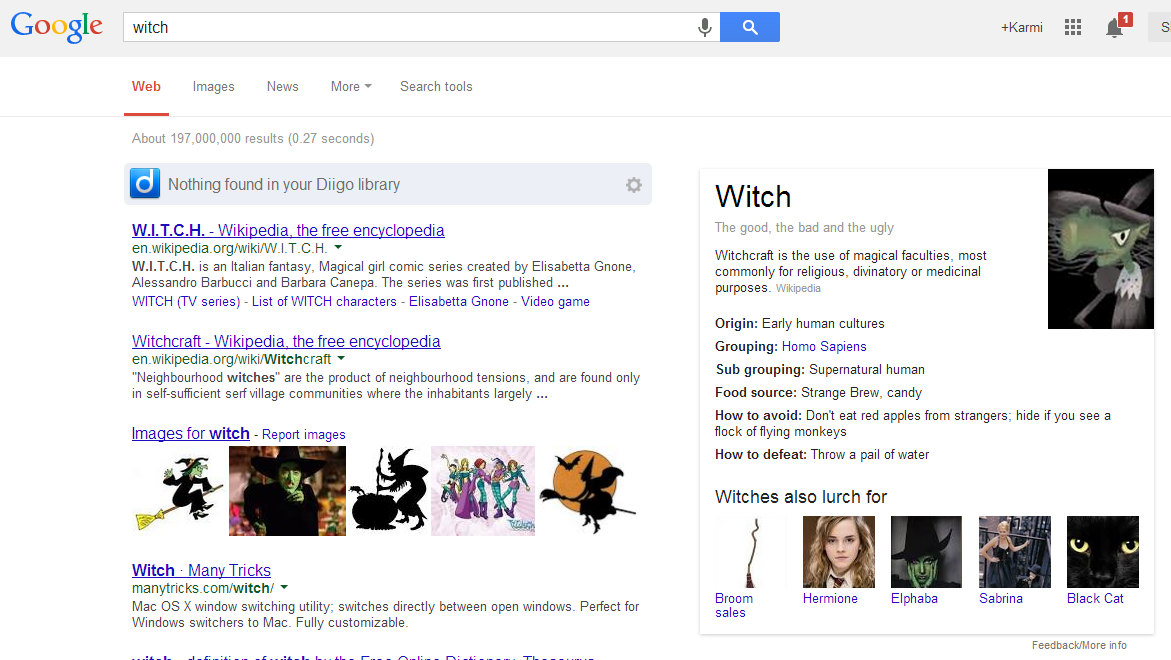
Here’s an screenshot of what you’ll see if you search for [witch] in Google. Try it here.


If it’s not immediately noticeable, look at the knowledge card on the right-hand side and you’ll see some light-hearted data on a witch, including its food source, how to avoid or defeat it, and other important facts. Similar results will appear if you’re searching for “ghost”, “evil robot”, “skeleton”, “grim reaper”, and others. Google wouldn’t divulge the exact number of keywords that would display these easter eggs, but a spokesperson said that each one has some interesting results.

Unfortunately, this trick won’t work if you’re using the voice command on Google Now.

Easter eggs are nothing new to Google. It has a long history with them across all of its services, including search, Google Maps/Earth, Gmail, Google Translate, and others.

So far we’ve counted six keywords that display the Halloween easter eggs — are there any others that you’ve found?!

Source: http://thenextweb.com/google/2013/10/30/trick-treat-google-lays-halloween-easter-eggs-knowledge-graph/

Happy Halloween 2013 with Google Search


Google has rolled out some easter eggs just in time for Halloween. The company revealed to us that if you query [ghost], [witch], or several other keywords that fit this yearly tradition, the Knowledge Graph will display some interesting results. This is something similar to what the company did with Google Nose during April Fool’s this year.

Here’s an screenshot of what you’ll see if you search for [witch] in Google. Try it here.


If it’s not immediately noticeable, look at the knowledge card on the right-hand side and you’ll see some light-hearted data on a witch, including its food source, how to avoid or defeat it, and other important facts. Similar results will appear if you’re searching for “ghost”, “evil robot”, “skeleton”, “grim reaper”, and others. Google wouldn’t divulge the exact number of keywords that would display these easter eggs, but a spokesperson said that each one has some interesting results.

Unfortunately, this trick won’t work if you’re using the voice command on Google Now.

Easter eggs are nothing new to Google. It has a long history with them across all of its services, including search, Google Maps/Earth, Gmail, Google Translate, and others.

So far we’ve counted six keywords that display the Halloween easter eggs — are there any others that you’ve found?!

Source: http://thenextweb.com/google/2013/10/30/trick-treat-google-lays-halloween-easter-eggs-knowledge-graph/


Why Google Trends is a market researcher’s best friend
Focus groups are a thing of the market researcher's past
Market research is critical to every business. Traditional market research is based on sampling, such as focus groups, and very often delivers skewed results and bad information. What people say and what people actually do are two totally different things.
If they use their tools correctly, the new age of Internet marketers have a wealth of information at their fingertips that give them a significant advantage over the competition.
recent Forbes article (among others) suggested, and showed, that the iPhone 5s is three times more popular than the iPhone 5c. The article had a lot of graphs, research, and sales data from multiple sources in it. To compile all the information in the article would have taken hundreds of hours and cost thousands of dollars. My initial reaction after reading the article was, “No shit, Sherlock.”
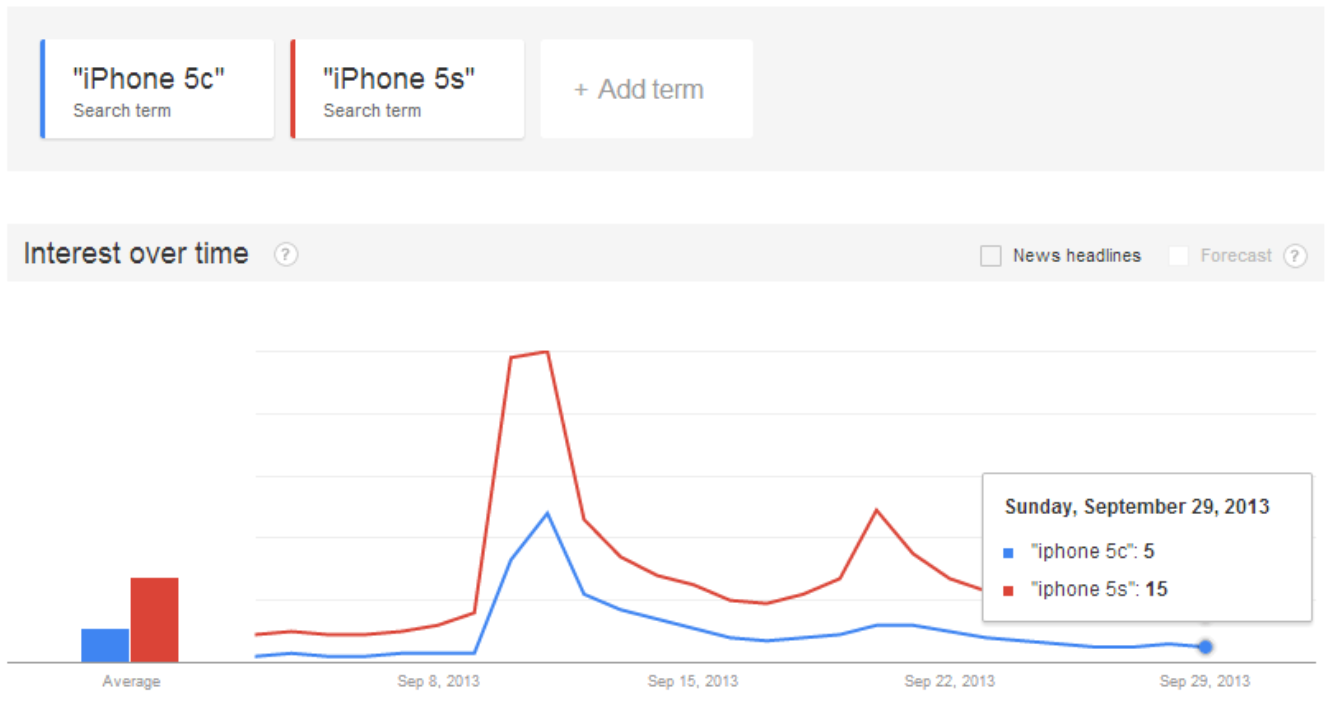
Given my company relies on being on top of consumer electronics trends, I had done 15 seconds of research a few days prior which had given me the same information:
This Google Trends information shows, in seconds, that the iPhone 5s is three times more popular than the iPhone 5c. This exactly correlates with the hundreds of hours of research and sales data analysis of non-readily available information that is exhibited in the Forbes articles. Much easier to do a 15 second look in Google Trends, isn’t it?
Any businessperson who is using old school market research techniques needs to wake up or move aside for someone who understands efficiency and accuracy.
Google Trends is a great tool that shows you comparative Google searches. This data is the equivalent of “brain to keyboard with no filter.” In my opinion, you can’t get better market research, especially for a company like Kogan which relies on servicing demand, rather than creating demand.
As a digital marketer, having the right information at your fingertips is critical for all sorts of business decisions. For instance:
1. We know that Air Conditioners sell better in summer and heaters sell better in winter :)
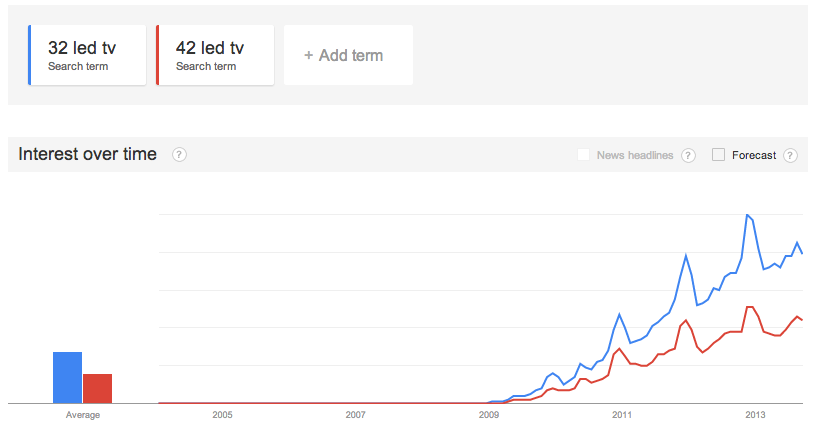
2. We know that we should be making twice as many 32″ LED TVs as 42″ LED TVs
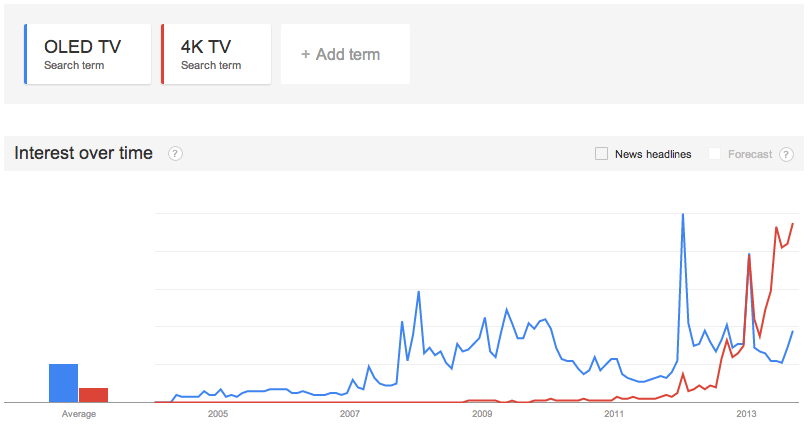
3. We know to concentrate on 4K TVs over OLED TVs as our next big product launch:
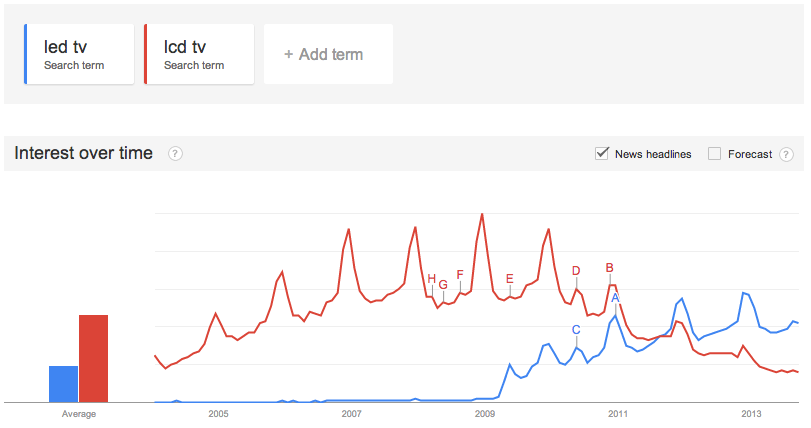
4. We knew in mid 2011 to slow down our production of LCD TVs and concentrate on LED TVs
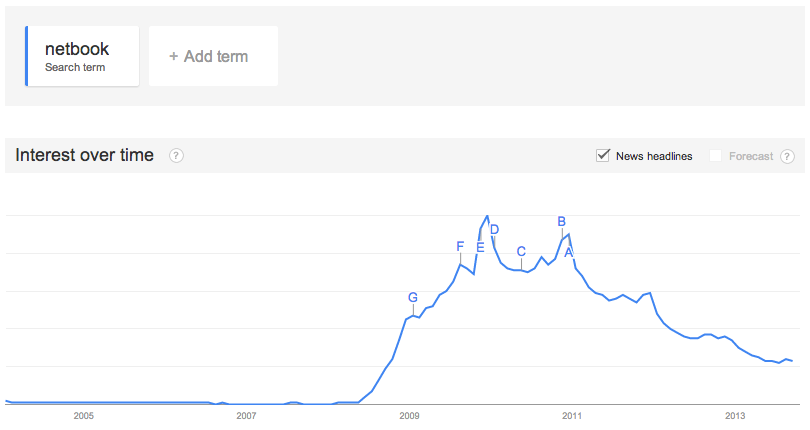
5. We launched the world first sub $500 Netbook in late 2008 and discontinued it in mid 2011
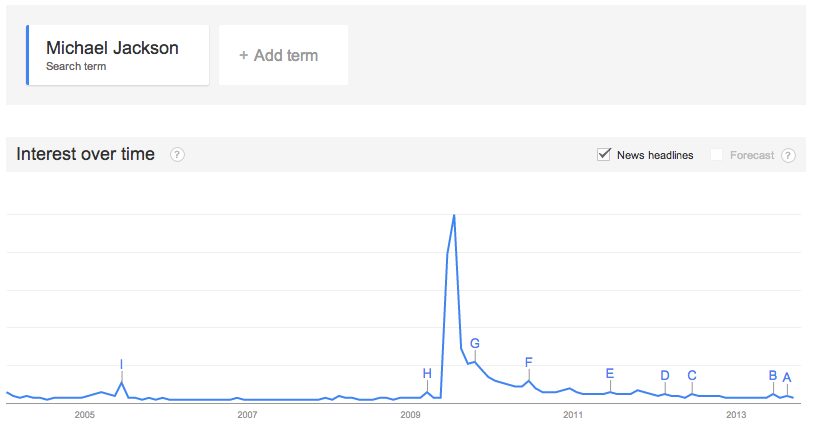
6. We know we’ve missed the boat if we want to sell Michael Jackson tshirts :)
As you can see, Google Trends is a marketers best friend. It gives you timely and accurate information which you can use to make real business decisions. Nothing beats brain to keyboard with no filter.
Don’t waste your time on old school reports produced using old school methodologies. At worst they are inaccurate, at best they are overpriced and inefficient.

What do you think of old school market research versus new methods like analyzing Google search data?

Why Google Trends is a market researcher’s best friend


Why Google Trends is a market researcher’s best friend
Focus groups are a thing of the market researcher's past
Market research is critical to every business. Traditional market research is based on sampling, such as focus groups, and very often delivers skewed results and bad information. What people say and what people actually do are two totally different things.
If they use their tools correctly, the new age of Internet marketers have a wealth of information at their fingertips that give them a significant advantage over the competition.
recent Forbes article (among others) suggested, and showed, that the iPhone 5s is three times more popular than the iPhone 5c. The article had a lot of graphs, research, and sales data from multiple sources in it. To compile all the information in the article would have taken hundreds of hours and cost thousands of dollars. My initial reaction after reading the article was, “No shit, Sherlock.”
Given my company relies on being on top of consumer electronics trends, I had done 15 seconds of research a few days prior which had given me the same information:
This Google Trends information shows, in seconds, that the iPhone 5s is three times more popular than the iPhone 5c. This exactly correlates with the hundreds of hours of research and sales data analysis of non-readily available information that is exhibited in the Forbes articles. Much easier to do a 15 second look in Google Trends, isn’t it?
Any businessperson who is using old school market research techniques needs to wake up or move aside for someone who understands efficiency and accuracy.
Google Trends is a great tool that shows you comparative Google searches. This data is the equivalent of “brain to keyboard with no filter.” In my opinion, you can’t get better market research, especially for a company like Kogan which relies on servicing demand, rather than creating demand.
As a digital marketer, having the right information at your fingertips is critical for all sorts of business decisions. For instance:
1. We know that Air Conditioners sell better in summer and heaters sell better in winter :)
2. We know that we should be making twice as many 32″ LED TVs as 42″ LED TVs
3. We know to concentrate on 4K TVs over OLED TVs as our next big product launch:
4. We knew in mid 2011 to slow down our production of LCD TVs and concentrate on LED TVs
5. We launched the world first sub $500 Netbook in late 2008 and discontinued it in mid 2011
6. We know we’ve missed the boat if we want to sell Michael Jackson tshirts :)
As you can see, Google Trends is a marketers best friend. It gives you timely and accurate information which you can use to make real business decisions. Nothing beats brain to keyboard with no filter.
Don’t waste your time on old school reports produced using old school methodologies. At worst they are inaccurate, at best they are overpriced and inefficient.

What do you think of old school market research versus new methods like analyzing Google search data?

Popular Posts